All Settings
Complete reference for every Strimma setting.
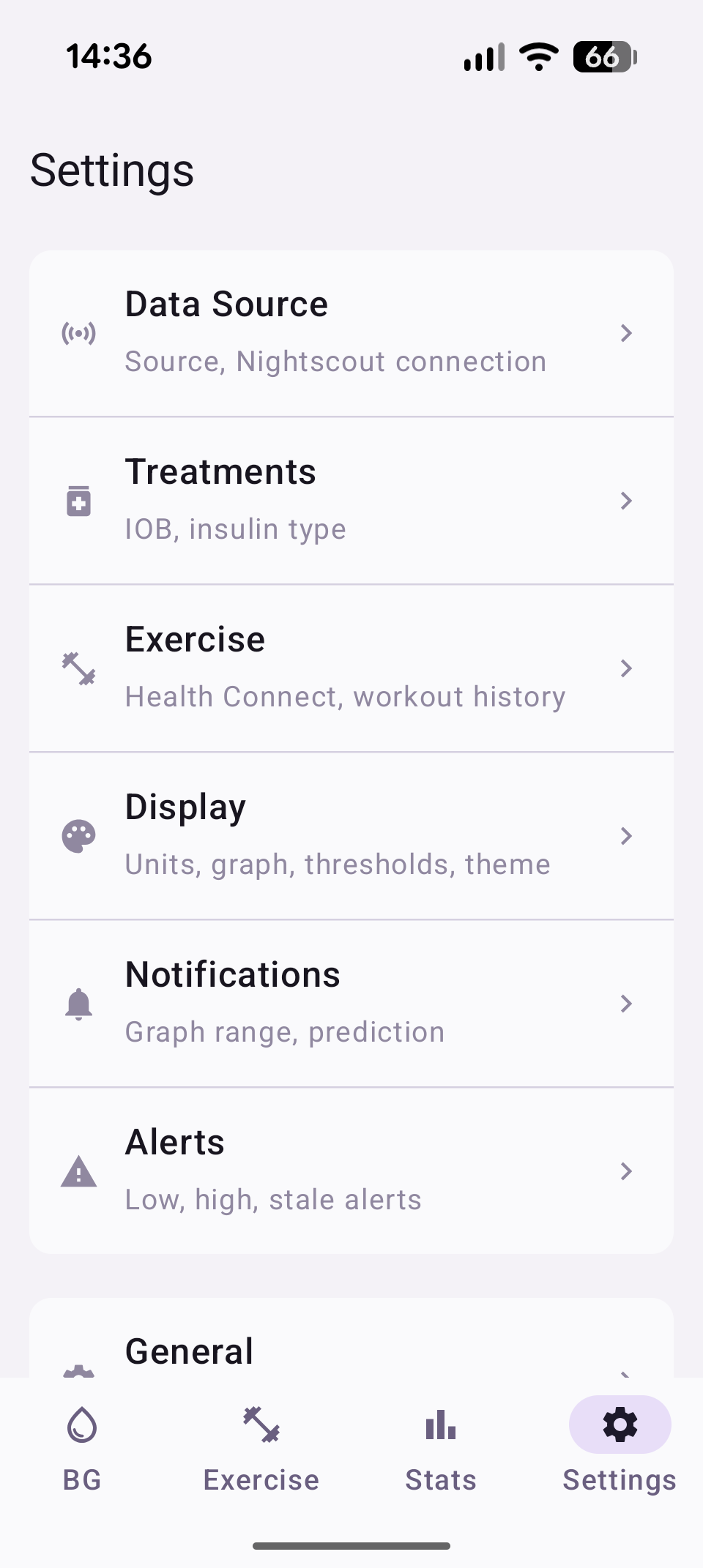
Note: No screenshot exists yet for the General detail screen, which now includes a new Storage section with the Data retention dropdown.
Settings Menu
The settings tab has two main cards:
- Configuration: Data Source, Treatments, Exercise, Display, Notifications, Alerts
- Tools: General, Sharing, Debug Log
Statistics is a separate bottom-tab, not part of Settings.
Data Source
Choose how Strimma receives glucose data and configure Nightscout.
| Setting | Description | Default |
|---|---|---|
| Source | How glucose data arrives — Companion, xDrip Broadcast, Nightscout Follower, or LibreLinkUp | Companion |
| Nightscout URL | Shared Nightscout server URL used for uploads, manual pulls, follower mode, and treatment sync | Empty |
| API Secret | API secret for the configured Nightscout server (stored encrypted) | Empty |
| Poll Interval | How often to check for new readings in Nightscout Follower mode (30–300 seconds) | 60s |
Nightscout Pull (Readings)
| Action | Description |
|---|---|
| Pull 7 days | Backfill 7 days of readings from the configured Nightscout server |
| Pull 14 days | Backfill 14 days |
| Pull 30 days | Backfill 30 days |
Auto-pull
When Strimma's database is empty (first install), it automatically pulls 100 days of history from Nightscout if a URL and secret are configured.
Large imports stay fast
Manual Nightscout pulls preserve the server's direction and delta values and insert readings in batches. This keeps large imports network-bound instead of recomputing trend data one reading at a time.
See Data Sources for details on each mode.
Treatments
Configure treatment sync and insulin parameters for IOB calculation.
| Setting | Description | Default |
|---|---|---|
| Treatment sync | Fetch bolus, carb, and basal data from Nightscout | Off |
| Insulin type | Insulin curve for IOB calculation | Fiasp |
| Custom DIA | Duration of Insulin Action in hours (only for Custom insulin) | 5.0h |
Nightscout Pull (Treatments)
When treatment sync is enabled:
| Action | Description |
|---|---|
| Pull 7 days | Backfill 7 days of treatments from Nightscout |
| Pull 14 days | Backfill 14 days |
| Pull 30 days | Backfill 30 days |
Unsupported vs failed treatment fetches
A Nightscout server that returns 404 for /api/v1/treatments.json is treated as not supporting treatments. Other HTTP and parse failures are treated as real sync errors and should be checked in the debug log.
Meal Time Slots
Configure when Breakfast, Lunch, and Dinner windows start and end. Meals outside these windows are classified as Snack.
| Setting | Default |
|---|---|
| Breakfast | 06:00–10:00 |
| Lunch | 11:30–14:30 |
| Dinner | 17:00–21:00 |
See Treatments & IOB for details.
Display
Configure units, graph window, thresholds, and theme.
| Setting | Description | Default |
|---|---|---|
| Unit | Display unit — mmol/L or mg/dL | mmol/L |
| Graph window | Main graph time range (1–8 hours) | 4 hours |
| BG Low | Low threshold for graph coloring and TIR | 4.0 mmol/L (72 mg/dL) |
| BG High | High threshold for graph coloring and TIR | 10.0 mmol/L (180 mg/dL) |
| Theme | App appearance — Light, Dark, or System | System |
| Language | App language — System, English, Svenska, Deutsch, Español, Français | System |
Notifications
Configure the foreground notification graph, prediction window, and action button.
| Setting | Description | Default |
|---|---|---|
| Graph time range | Time shown in notification graph (30m, 1h, 2h, 3h) | 1 hour |
| Prediction window | How far ahead to predict (Off, 15 min, 30 min) | 15 min |
| Action Button | What the notification's tap-target button does — None, Workout, or Snooze | Workout |
| Snooze Category | Only when Action Button = Snooze. Which alerts the button pauses — All, High, or Low | All |
| Snooze Duration | Only when Action Button = Snooze. How long the pause lasts — 15m, 30m, 1h, 2h, or 3h | 1h |
When alerts are paused (via the action button or the in-app pause sheet), the foreground notification's subtitle includes a "paused" indicator showing how long remains.
See Notifications for full details on the action button.
Alerts
Configure glucose alerts in four sections:
- Alerts — the independent Regular protocol: Urgent Low, Low, High, Urgent High, Low Soon, High Soon, and Stale Data alerts. These rows also have Sound buttons for Android notification-channel customization.
- Exercise Alerts — the independent protocol selected while Workout Mode is active, with its own alert enablement and threshold controls. Exercise Low and Exercise High also define the exercise graph range. These rows have no separate Sound buttons.
- Alert Behavior — shared Alert Snooze Duration and Cooldown controls. Each appears once and applies to the active alert protocol.
- Pattern Insights — toggle for recurring pattern detection on the home screen. See Pattern Insights for details.
Regular and Exercise protocols use the same Android notification channel for each corresponding alert type. Changing one protocol does not change the other.
The values below are Regular protocol defaults; Exercise Alerts stores a separate set of values.
| Setting | Description | Default |
|---|---|---|
| Urgent Low | Alert for dangerously low glucose | Enabled, 3.0 mmol/L (54 mg/dL) |
| Low | Alert for low glucose | Enabled, 4.0 mmol/L (72 mg/dL) |
| High | Alert for high glucose | Enabled, 10.0 mmol/L (180 mg/dL) |
| Urgent High | Alert for dangerously high glucose | Enabled, 13.0 mmol/L (234 mg/dL) |
| Low Soon | Alert when predicted to go low | Enabled |
| High Soon | Alert when predicted to go high | Enabled |
| Stale Data | Alert when no reading for 10+ minutes | Enabled |
| Alert Snooze Duration | How long the alert notification Snooze button silences that alert and less severe alerts in the same category — 15m, 30m, 1h, 2h, or 3h. Independent of Notifications → Action Button → Duration | 30m |
| Cooldown | Suppresses repeats of the same alarm while out of range — Off, 5m, 10m, or 15m | Off |
See Alerts for full details.
Exercise
Configure Health Connect integration, workout calendar, and pre-activity guidance.
Health Connect
| Setting | Description | Default |
|---|---|---|
| Health Connect sync | Read exercise sessions from Health Connect | Off |
| Write glucose | Write CGM readings to Health Connect | Off |
| Max heart rate | Used for intensity detection on completed sessions | 190 BPM |
Workout Calendar
| Setting | Description | Default |
|---|---|---|
| Calendar | Which Android calendar to monitor for workouts | None |
| Lookahead | How far ahead to scan for upcoming workouts | 3 hours |
| Guidance trigger | When the pre-activity card appears on main screen | 120 min before |
Category Target Ranges
Each exercise category (Running, Cycling, Strength, etc.) has a configurable low and high BG threshold. Defaults come from the category's metabolic profile (Aerobic, Resistance, or High-Intensity).
See Exercise for details.
General
Startup behavior, storage, battery, updates, and version info.
| Setting | Description | Default |
|---|---|---|
| Start on boot | Automatically start Strimma when the phone restarts | On |
| Data retention | How long readings, treatments, and exercise sessions are kept on this device. Older data is permanently deleted. The Story view can only show months that fit inside this window. Options: 3 months / 6 months / 1 year / 5 years / Forever | Forever |
| Battery optimization | Shows whether Strimma is exempt from battery optimization | — |
| Version | Current app version | — |
| Check for updates | Manually check GitHub for a new stable release | — |
| Check for beta | Check for pre-release versions (release candidates, betas) | — |
Sharing
Integrations and backup.
Integration
| Setting | Description | Default |
|---|---|---|
| BG Broadcast | Send xDrip-compatible broadcast intent | Off |
| Local Web Server | Serve BG on port 17580 for watches and apps | Off |
| Web Server API Secret | Secret for authenticating web server requests | Empty |
Tidepool
| Setting | Description | Default |
|---|---|---|
| Upload to Tidepool | Sync CGM data to your Tidepool account | Off |
| Login with Tidepool | Opens Tidepool's login page in your browser (OIDC with PKCE) | — |
| Force Upload Now | Manually trigger an upload of recent readings | — |
When enabled and logged in, Strimma uploads glucose readings to Tidepool in the background. This runs independently of Nightscout uploads — both can be active simultaneously.
Automatic Tidepool uploads are throttled to one background attempt every 20 minutes, even after a failed upload. Force Upload Now bypasses that background wait.
Tidepool consent
On first login, Strimma shows a consent dialog explaining that uploaded data is subject to Tidepool's Privacy Policy and Terms of Use. You can disconnect at any time.
Backup
| Action | Description |
|---|---|
| Export Settings | Save all settings to a JSON file |
| Import Settings | Restore settings from a previously exported file |
Export contains secrets
The exported settings file includes your Nightscout URL and API secret in plain text. Handle the file securely.
Debug Log
Opens the Debug Screen showing real-time and file-based logs. Useful for troubleshooting issues with data reception.